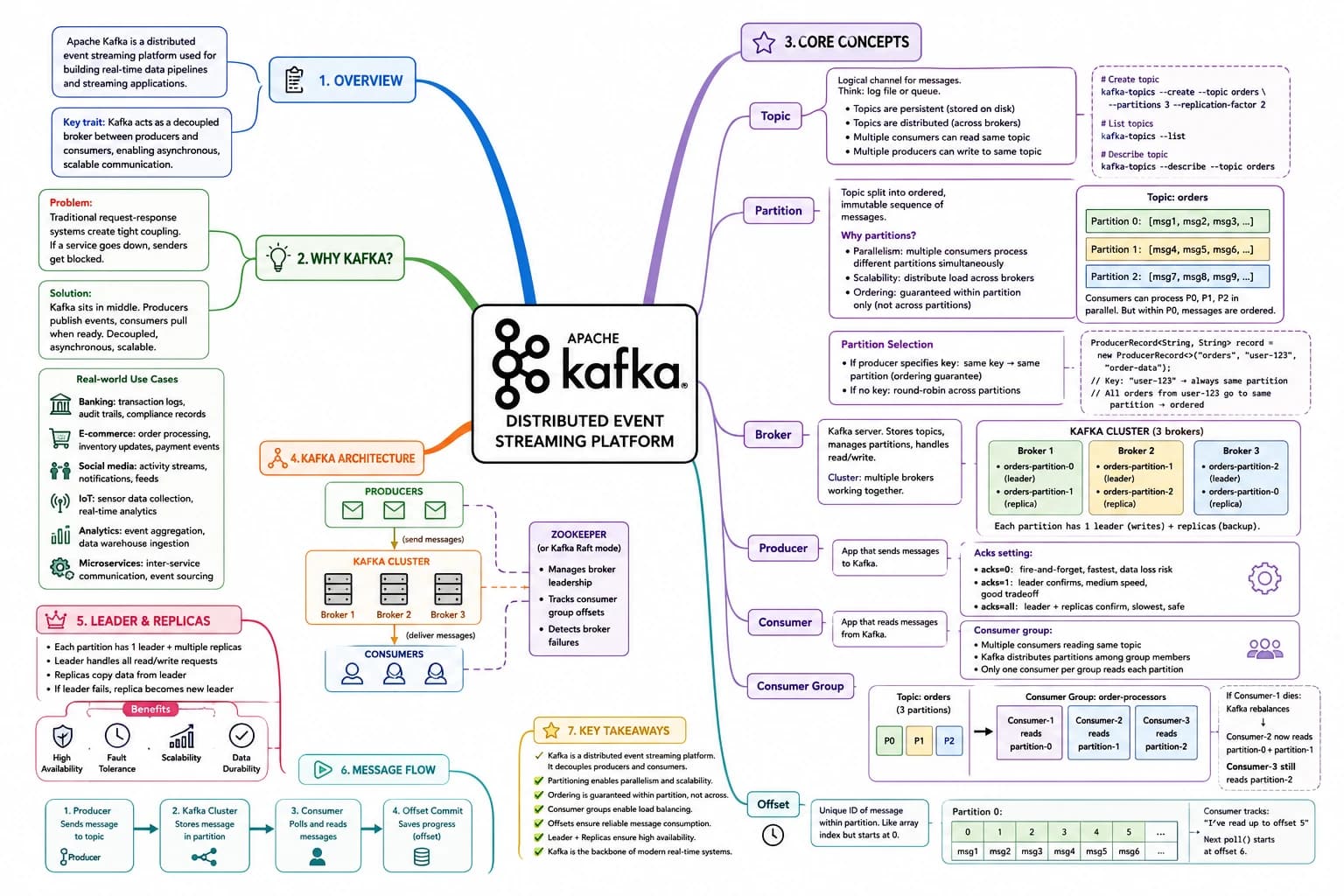
🎯 #Big picture of how Kafka works in production systems.#
Read top-to-bottom — each layer builds on the previous one.
The One Rule That Makes Kafka Click
Kafka is a distributed event streaming system.
Instead of services directly calling each other:
Service A → Service B
Kafka sits in the middle:
Producer → Kafka → Consumer
This creates:
- decoupling
- scalability
- retry handling
- parallel processing
- fault tolerance
If you remember only one thing:
Kafka stores events and lets consumers process them independently.
Layer 0 — Kafka Cluster
A Kafka Cluster is the complete Kafka system.
KAFKA CLUSTER
├── Broker 1
├── Broker 2
├── Broker 3
└── Broker N
Why multiple brokers?
- high availability
- replication
- horizontal scaling
- fault tolerance
If one broker crashes, Kafka still works.
Layer 1 — Brokers
A Broker is an actual Kafka server.
Its job:
- store messages
- manage partitions
- handle producers
- handle consumers
- replicate data
Producer → Broker → Consumer
Production systems usually have:
- 3 brokers
- 5 brokers
- 10+ brokers
depending on scale.
Layer 2 — Topics
A Topic is a category of messages.
Examples:
payments
orders
notifications
emails
ledger-events
Producers send messages into topics.
Consumers read messages from topics.
Layer 3 — Partitions (The Real Scaling Unit)
Topics are divided into partitions.
payments
├── Partition 0
├── Partition 1
├── Partition 2
└── Partition 3
Partitions solve:
- parallel processing
- scaling
- load distribution
The Most Important Kafka Rule
Kafka guarantees ordering only inside a partition.
Partition 0
Offset 0 → Payment Created
Offset 1 → Payment Success
Offset 2 → Ledger Updated
This order is guaranteed.
Layer 4 — Producers
Producers send events into Kafka.
Example:
Payment Service
   ↓
Kafka Producer
   ↓
payments topic
Production producers usually use:
- retries
- acks=all
- idempotence
- compression
- batching
to avoid data loss.
Layer 5 — Consumers
Consumers read messages from Kafka.
payments topic
   ↓
Consumer
   ↓
Process Payment
Consumers usually:
- save DB data
- call APIs
- send notifications
- update ledgers
- trigger workflows
Layer 6 — Consumer Groups
A Consumer Group is a team of consumers working together.
payment-group
├── Consumer 1
├── Consumer 2
└── Consumer 3
Kafka distributes partitions among consumers.
Partition 0 → Consumer 1
Partition 1 → Consumer 2
Partition 2 → Consumer 3
This enables parallel processing.
Important Kafka Rule
One partition
→ only one consumer in same group
This prevents duplicate processing.
Layer 7 — Offsets
Every message inside a partition has an offset.
Offset 0
Offset 1
Offset 2
Offsets are basically:
- message positions
- progress trackers
Consumers commit offsets after successful processing.
Layer 8 — Replication
Kafka replicates partitions across brokers.
Partition 0
├── Leader  → Broker 1
├── Replica → Broker 2
└── Replica → Broker 3
If Broker 1 crashes:
- replica becomes leader
- system continues running
This provides fault tolerance.
Layer 9 — Retry + DLQ
Production systems always use retries.
Main Topic
   ↓ fail
Retry Topic
   ↓ fail again
DLQ (Dead Letter Queue)
Used for:
- temporary API failures
- DB issues
- payment gateway failures
- webhook failures
Layer 10 — Idempotency
Kafka retries can create duplicate processing.
Real systems solve this using:
transactionId
Example:
UNIQUE(transaction_id)
This prevents:
- duplicate payments
- duplicate ledger entries
- double processing
Layer 11 — Scaling Model
Kafka scales using:
#Partitions#
NOT by endlessly increasing threads.
Production scaling usually looks like:
More traffic
   ↓
Increase partitions
   ↓
Add more consumers
   ↓
Add more machines
Layer 12 — Admin Role
Kafka Admin usually manages:
- brokers
- topics
- partitions
- ACLs
- security
- monitoring
- retention policies
Admin controls the Kafka infrastructure.
Layer 13 — Production Flow
Client/API
   ↓
Producer
   ↓
Kafka Topic
   ↓
Partitions
   ↓
Kafka Brokers
   ↓
Consumer Group
   ↓
Consumers
   ↓
Database / APIs / Notifications
Real Production Mental Model
Think of Kafka as:
A distributed event pipeline where producers continuously send events and consumers process them independently at their own speed.
Kafka handles:
- replication
- failover
- ordering within partitions
- message storage
- consumer coordination
Applications handle:
- business logic
- retries
- idempotency
- validations
- database updates
Final Takeaway
Don’t memorize definitions.
Memorize the flow:
Producer
   ↓
Topic
   ↓
Partitions
   ↓
Broker
   ↓
Consumer Group
   ↓
Consumers
   ↓
Business Logic
That is the real Kafka mental model.